Home

Clients & sales

  • Client managementClient details, company and VAT numbers, payment terms
  • Intake formCollect details from a potential customer and continue yourself to a lead
  • LeadsTrack potential customers through to a quote and won work
  • Client portalShare quotes, contracts, invoices and project information with your client
  • QuotesCreate, send and convert a quote into an invoice
  • ContractsService agreement with digital signature
  • Assignment checkIs a job worth it? Check before you say yes

Work & projects

  • ProjectsFrom signed contract to a project with time and costs
  • Project tasksTasks, deadlines and logged hours inside a project
  • Project profitabilityInvoiced and collected revenue, direct costs and margin on one project
  • Time trackingLog hours per client or project and bill them
  • Mileage logKeep business trips with a rate per kilometre
  • Products & servicesSave price and VAT once, reuse everywhere

Invoicing & admin

  • InvoicesInvoices with Dutch VAT, numbering and PDF
  • Recurring invoicesDraft invoices generated monthly, quarterly or yearly
  • Payment remindersReminders before and after the due date
  • ExpensesBusiness costs with VAT, category and receipt
  • Purchase invoicesKeep supplier invoices with their file attached
  • Bank CSV importImport a statement and match payments to invoices

Tax & bookkeeping

  • Financial overviewIncome, expenses and open invoices per period or client
  • Tax calculatorIndicative estimate of tax and net income
  • Bookkeeper packageExport and secure share link for your bookkeeper
  • Hourly rate calculatorFree: work out the hourly rate you need
  • Hours criterion calculatorFree: do you reach the 1,225 hours for entrepreneur deductions?

Documents

  • Multilingual invoicesDocuments in 7 languages, set per client
  • CV makerFreelance CV or portfolio with a shareable link
View all tools

Popular

  • Freelancers (ZZP)
  • Construction
  • Cleaning
  • Consultants
  • Coaches
View all industries
Pricing
Log inSign up
←Home

Clients & sales

  • Client managementClient details, company and VAT numbers, payment terms
  • Intake formCollect details from a potential customer and continue yourself to a lead
  • LeadsTrack potential customers through to a quote and won work
  • Client portalShare quotes, contracts, invoices and project information with your client
  • QuotesCreate, send and convert a quote into an invoice
  • ContractsService agreement with digital signature
  • Assignment checkIs a job worth it? Check before you say yes

Work & projects

  • ProjectsFrom signed contract to a project with time and costs
  • Project tasksTasks, deadlines and logged hours inside a project
  • Project profitabilityInvoiced and collected revenue, direct costs and margin on one project
  • Time trackingLog hours per client or project and bill them
  • Mileage logKeep business trips with a rate per kilometre
  • Products & servicesSave price and VAT once, reuse everywhere

Invoicing & admin

  • InvoicesInvoices with Dutch VAT, numbering and PDF
  • Recurring invoicesDraft invoices generated monthly, quarterly or yearly
  • Payment remindersReminders before and after the due date
  • ExpensesBusiness costs with VAT, category and receipt
  • Purchase invoicesKeep supplier invoices with their file attached
  • Bank CSV importImport a statement and match payments to invoices

Tax & bookkeeping

  • Financial overviewIncome, expenses and open invoices per period or client
  • Tax calculatorIndicative estimate of tax and net income
  • Bookkeeper packageExport and secure share link for your bookkeeper
  • Hourly rate calculatorFree: work out the hourly rate you need
  • Hours criterion calculatorFree: do you reach the 1,225 hours for entrepreneur deductions?

Documents

  • Multilingual invoicesDocuments in 7 languages, set per client
  • CV makerFreelance CV or portfolio with a shareable link
View all tools

Popular

  • Freelancers (ZZP)
  • Construction
  • Cleaning
  • Consultants
  • Coaches
View all industries
SSmartWerk

Send a payment reminder as a freelancer: friendly, clear and on time

Invoicing & admin

Send a reminder before the due date from your invoice list and follow up overdue invoices with a friendly, a firm and a final reminder.

Start for freeView pricing

Start free, no credit card needed.

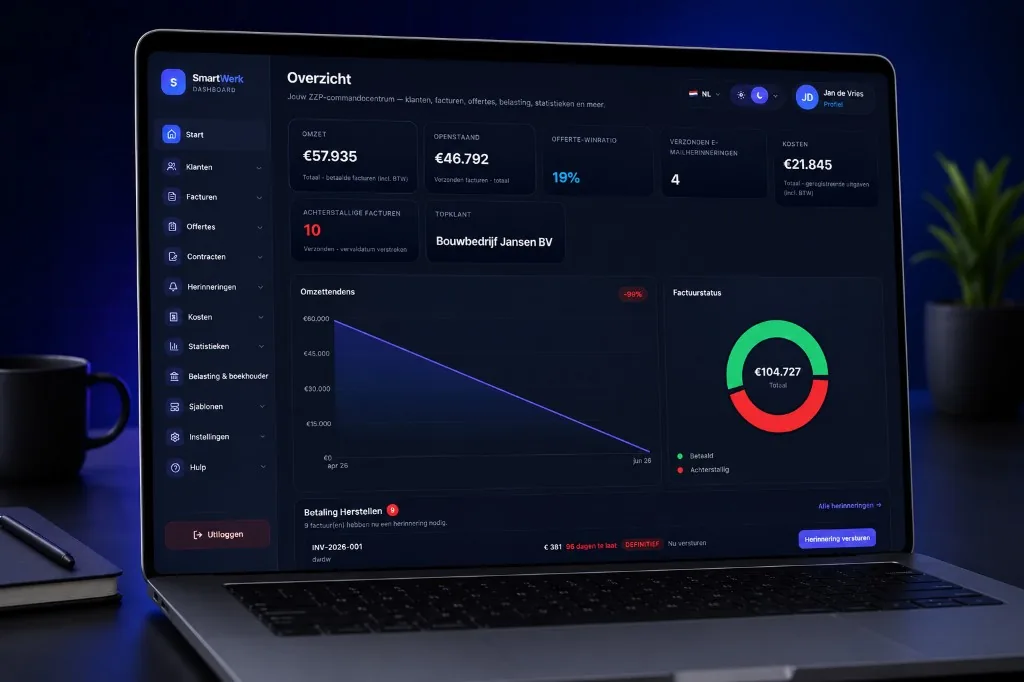
SmartWerk dashboard with turnover, outstanding invoices and invoice status
InvoicesInvoices with Dutch VAT, numbering and PDF
01

What is it?

Payment reminders in SmartWerk help you follow up a payment without writing an email every time.

02

Who is it for?

For freelancers who do not like chasing their money but cannot let it slide either.

03

What problem does it solve?

An open invoice is quickly forgotten, and writing a reminder feels awkward. Without a fixed approach it becomes postponement, and postponement costs liquidity.

What you get

01

Remind before the due date

From your invoice list, send one reminder before the term expires, up to seven days ahead.

Start for free
SSStudio SanneKvK 84726193 · NL002187364B21Invoice2026-041
ClientBakkerij Van DijkDue date22-10-2026
Website onderhoud8 × € 85€ 680.00
Fotografie productpagina’s1 × € 320€ 320.00
Subtotal€ 1,000.00VAT 21%€ 210.00Total€ 1,210.00
NL91 ABNA 0417 1643 00
02

Follow up after the due date

For an overdue invoice you follow up in three steps: friendly, firm and final.

Start for free
InvoicesNew
ClientStatusAmount
BVBakkerij Van Dijk2026-041Paid€ 1,210.00
SNStudio Noord2026-040Sent€ 3,025.00
DVDe Vries Advies2026-039Overdue€ 847.50
MDMeridian Design2026-038Draft€ 605.00
GBGreenTech BV2026-037Paid€ 2,420.00
03

Everything is in it

A reminder states invoice number, amount and payment instructions, so your client can pay straight away.

Start for free
Invoice 2026-040
Draft29-09-2026
Sent30-09-2026€ 3,025.00
Due date14-10-2026
Paid—
04

You stay in control

You send the reminders yourself or let the follow-up of overdue invoices run automatically.

Start for free
InvoicesNew
ClientNextAmount
Bakkerij Van DijkEvery month30-10-2026€ 175.45
Studio NoordEvery month31-10-2026€ 102.85
GreenTech BVEvery quarter17-11-2026€ 480.00
Fietsenmaker SmitEvery month01-11-2026€ 59.29

How it works in SmartWerk

  1. 1

    Send your invoice

    Create the invoice with a payment term and send it to your client.

  2. 2

    Remind before the due date

    From the invoice list, send one reminder, up to seven days before or on the due date.

  3. 3

    Follow up after the due date

    Use the reminders for overdue invoices: friendly first, firmer later.

  4. 4

    Go further if needed

    If payment stays out, you can send a formal notice outside SmartWerk or start collection.

Part of one workflow

SmartWerk follows a job from client to bookkeeper. The highlighted step is this page.

  1. Client
  2. Quote
  3. Contract
  4. Project
  5. Time · km · costs
  6. Invoice (You are here)
  7. Reminder
  8. Bookkeeper / tax

What you can do

Reminders belong with the invoice: your client, the amount and the payment details are already in it.

  • Reminder before the due date

    One message per invoice, as long as the invoice has not expired yet.

  • Three steps after the due date

    Friendly after about seven days, firm after about fourteen and a final reminder after thirty days or more.

  • Payment details in every message

    Invoice number, amount and payment instructions are in the email.

  • Manual or automatic

    Send yourself, in bulk or let the follow-up run automatically.

  • Seven languages

    Reminders can be in your client’s language: Dutch, English, German, French, Spanish, Polish or Russian.

Connected to other tools

  • Recurring invoicesDraft invoices generated monthly, quarterly or yearly
  • Payment remindersReminders before and after the due date
  • Multilingual invoicesDocuments in 7 languages, set per client
  • Bank CSV importImport a statement and match payments to invoices
  • Bookkeeper packageExport and secure share link for your bookkeeper
  • Client portalShare quotes, contracts, invoices and project information with your client
  • Project profitabilityInvoiced and collected revenue, direct costs and margin on one project

Frequently asked questions

When do you send a payment reminder?

Before the due date you can send one reminder from your invoice list. After the due date you follow up with a friendly reminder after about seven days, a firmer one after about fourteen and a final one after thirty days or more.

What should a payment reminder say?

The invoice number, invoice date, amount, the expired due date and payment instructions such as your IBAN and a payment reference, in a polite tone.

Can I charge statutory interest?

For business payments, statutory commercial interest may apply if a payment term was agreed. Take advice if in doubt.

When do I involve a collection agency?

Usually after one or more reminders and a formal notice with an extra term. You do that outside SmartWerk, preferably with advice.

What it does not do

  • SmartWerk gives no legal advice and does not carry out collection. A formal notice, collection or court step you take outside SmartWerk.
  • Reminders are not automatically matched to a payment; you see for yourself whether an invoice has been paid.

Try it with your own data

Create a free account and start with one client. Upgrading can wait until you really need a feature.

Start for freeView pricing

Related tools

Invoicing + contractsInvoicesBank CSV importRecurring invoices

Related articles

Non-paying clients as a freelancer: action plan and debt collectionSending invoices as a freelancer: what must be included?

Comparisons

SmartWerk vs e-Boekhouden
HelpContactCompany detailsPrivacySecurityTermsCookiesDPASubprocessorsWithdrawal

© 2026 SmartWerk. All rights reserved.